
The LinkReboot user guide: from your first free link to a tracked portfolio
LinkReboot turns the slow, manual process of finding good expired-domain backlinks into something you can do in an afternoon. This guide walks you through the platform end-to-end: how the free side works, when to spend credits, how the metrics fit together, what happens if a link turns out to be dead, and how to keep track of every domain you eventually register.
If you're new, read it top to bottom. If you've already poked around, jump to the section you need.
What does LinkReboot do?
Domains expire every day. When they do, the backlinks pointing to them don't disappear — they just sit on the referring page, waiting for someone to register the domain again and reclaim them. LinkReboot maintains a continuously updated database of those expired domains, scored with the SEO metrics you already use (Moz Domain Authority, Page Authority, Spam Score; Majestic Trust Flow and Citation Flow), with the referring page URL, anchor text, and authority site behind a small credit unlock. Once you've found one you want, you register the domain elsewhere and the inbound link is yours.
Who this is for
SEOs are building topical authority for a client or in-house site.
Link builders who'd rather buy a domain with 50 referring domains than spend a quarter pitching guest posts.
Niche-site operators looking for cheap, durable backlinks in their topic.
Agencies running multiple client portfolios that need defensible, transparent metrics.
If you've never heard of expired-domain link building, the short version is: it's one of the few link-building tactics where the link already exists on a real, third-party page. You're not asking a webmaster to add a link — you're inheriting one.
Step 1: Start with Free Links
Before you spend a cent, open Free Links. This page rotates a curated subset of the database every day. You can unlock the full details of any domain on it without using credits, subject to a daily and monthly cap.
Free Links is the right place to learn how the data feels. Use it to:
Get used to reading the metrics columns (DA, PA, Trust Flow, Citation Flow, Spam Score, etc.).
Spot a few real backlinks worth registering — without committing to a credit purchase.
Test your filtering instincts before scaling up on the paid catalogue.
Domains unlocked using Free Links are not added to your Viewed Domains page. Domains unlocked through free links remain available only within the Free Links table, and you can return at any time later to view them again.
Step 2: Browse Premium Links
When you're ready to scale, switch to Premium Links. This is the full catalogue — typically much larger (200x) than the free rotation, with finer-grained filters and the freshest inventory.
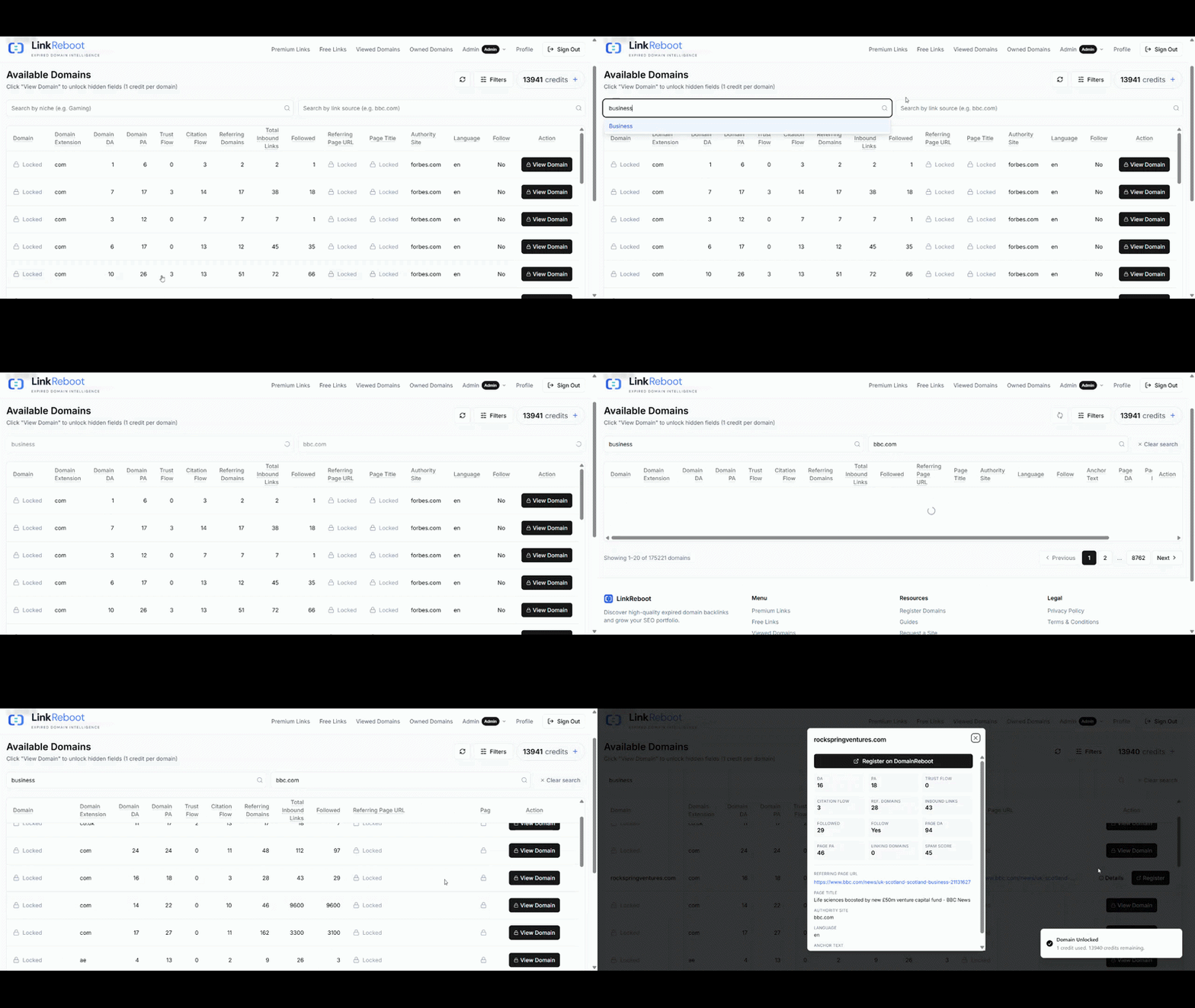
The browse page lists each domain with its public metrics on display. The bits behind the credit unlock are the ones that actually let you take action: the exact referring page URL, the anchor text, and the authority site hosting the link. Until you spend a credit, you can see that a strong backlink exists, but not where exactly.
Step 3: Read the metrics like a pro
Every column on the listing has a one-line tooltip — hover any header to see it. The condensed cheat sheet:
Domain DA — Moz Domain Authority of the expired domain (0–100). Higher = stronger backlink profile across the whole site.
Domain PA — Moz Page Authority of the home page. Predicts how that single URL ranks.
Trust Flow — Majestic's quality score. Built from a trusted seed set, so it's a fair proxy for "are these links real?"
Citation Flow — Majestic's volume score. Trust Flow alone is misleading; pair them.
Referring Domains — unique domains pointing in. Diversity beats raw count.
Followed — how many of the inbound links pass. Compare with total inbound links to gauge SEO equity.
Spam Score — Moz's red-flag score (0–17). Anything above 6 deserves a closer look; above 10 is usually a pass.
Language — the dominant language of the referring page. Filter to your target market.
The deeper guides on this blog walk through each metric individually with worked examples; this section is just enough to start filtering.
Step 4: Unlock a domain
When you find a domain worth investigating, click View Domain. One credit will be charged to unlock the domain, and the gated columns will be revealed instantly in place. The unlocked row also lands in your Viewed Domains list with the same data, so you don't need to copy anything down.
From the unlocked row, you can:
Click the referring page URL to verify the backlink exists, see its placement, and read the surrounding context.
Confirm the domain is actually available (we re-check at unlock time, but a sanity check at your registrar of choice is always a good habit).
Register the domain — LinkReboot doesn't sell domains itself, so you'll do this at your usual registrar or via the partner link.
Step 5: When something's off — refunds and complaints
The internet is messy. Sometimes a domain that looked available has been registered between our last crawl and your unlock; sometimes the referring page removes the link before you get to it. LinkReboot has an automated complaint flow for both cases.
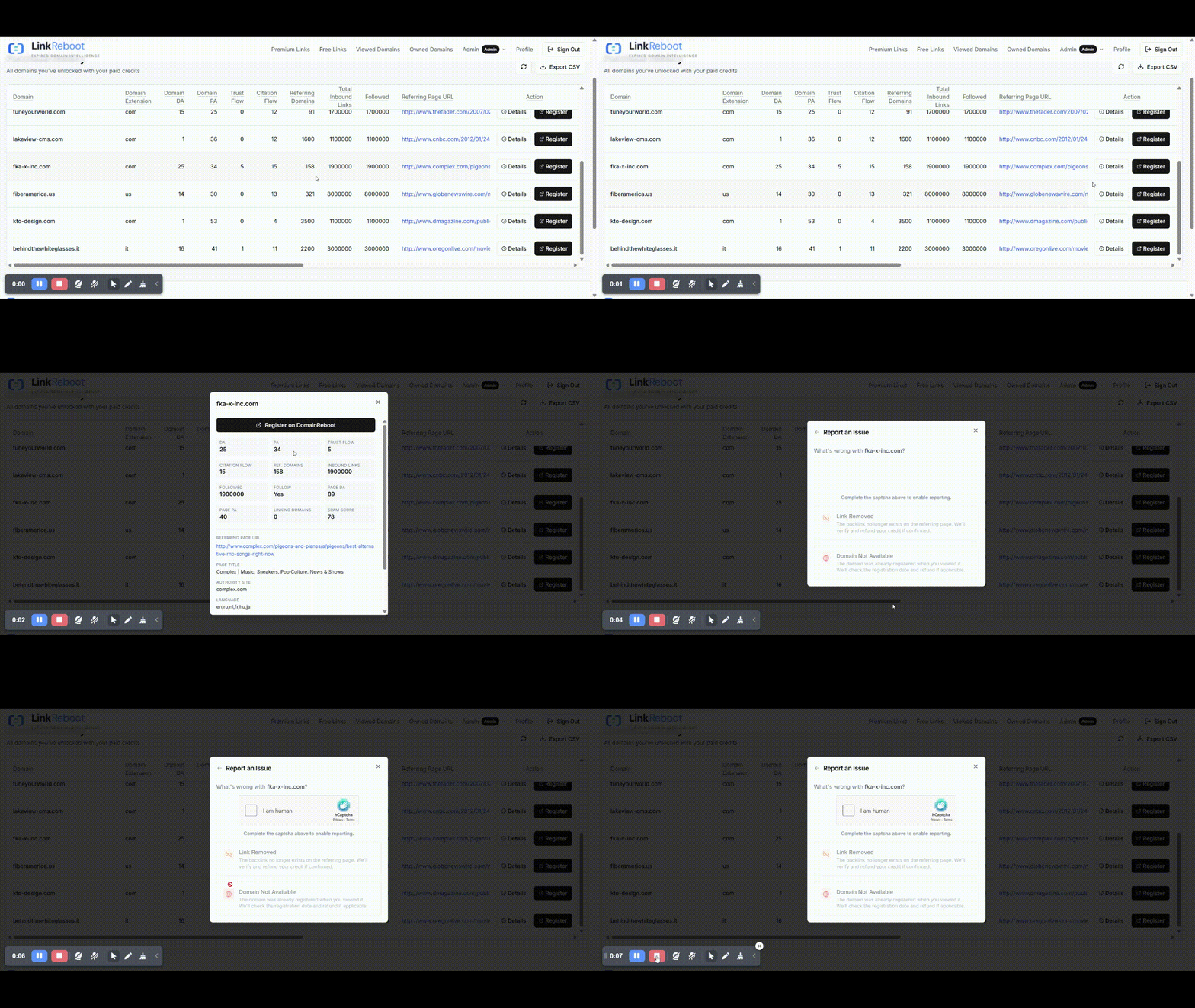
From any row in your Viewed Domains list:
"Domain not available" — we re-run a live registry lookup. If the domain is registered before you view it, your credit will be automatically refunded. If our availability check shows the domain is still available and you believe this is incorrect, please contact our support team. Your complaint will then be escalated to a human reviewer.
"Backlink was removed" — we re-fetch the referring page and check whether the link to the domain still exists. If it doesn't, your credit is refunded automatically.
Refunded credits return to your balance instantly.
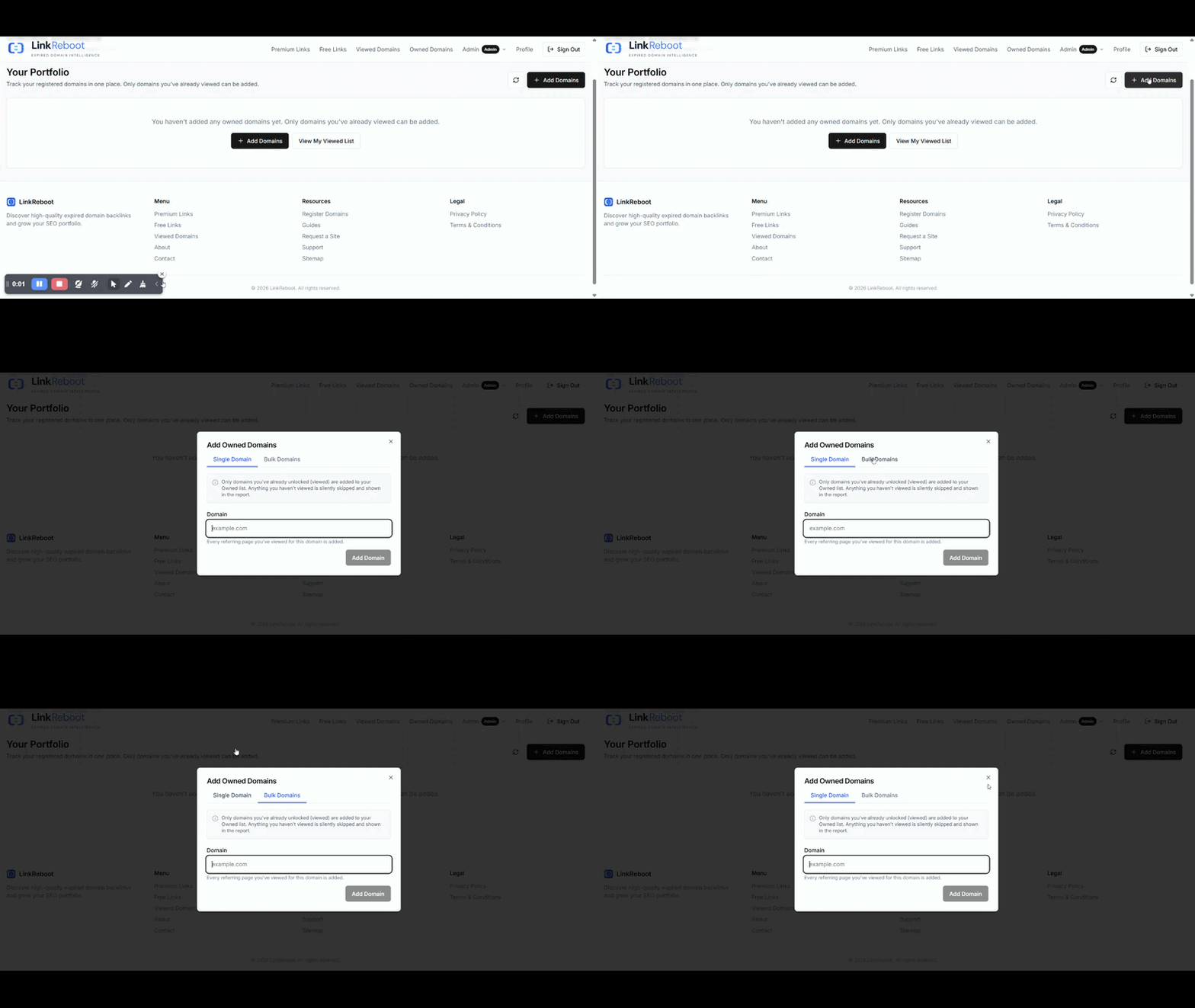
Step 6: Add reclaimed domains to your Owned Domains list
Once you've actually registered a domain, add it to Owned Domains. This is more than a list — LinkReboot snapshots the metrics from the moment you unlocked the domain and then enriches them with live signals you can't get from a static export:
Registry lookup — registration date, expiration date, last-changed date, and current nameservers. Useful for spotting renewal cliffs and confirming that the domain you just registered is now actually under your control.
HTTP check— the current status code and any redirect chain. If you've put a 301 in place, you can see at a glance whether it's resolving as intended.
This turns Owned Domains into a live portfolio dashboard rather than a spreadsheet you have to maintain by hand.
Step 7: What to do with the domain you reclaimed
Three common patterns, each suited to a different goal:
301 redirect to your money site. Fast, low-effort. The simplest way to channel link equity, but be selective — Google ignores redirects that aren't topically related, and a 301 from a totally off-topic domain wastes the link.
Rebuild a real site on the domain (or a thin "bio" page for a public figure / business). More work, but the domain stays a standalone asset and the link is much harder to discount.
Use it as part of a private network. We won't pretend this isn't a strategy people use; we will say it's higher risk and Google's spam team has gotten markedly better at detecting low-quality networks. Read up before going this route.
A future post will walk through all three in detail.
Pricing in 60 seconds
Each unlock costs 1 credit ($0.50).
Credits are bought in bundles (20 / 100 / 500). Larger bundles are about convenience, contact support for bulk order discounts.
Credits don't expire.
Refunded credits go back to your balance instantly and can be spent again.
No subscriptions. You only pay when you unlock.
You can buy credits at any time from the Premium Links page or your profile.
FAQ
Does LinkReboot register the domain for me?
No. We surface the data and verify availability at unlock time. You register the domain at your usual registrar — that's the safest pattern for both sides, and it keeps the WHOIS/registrant record cleanly in your name.
How fresh is the data?
The catalogue is continuously updated, and we re-verify availability at the moment you unlock. The complaint flow exists precisely because the registry can change between our last full crawl and your action — most of the time it's fine, and when it isn't, you get refunded.
Can I export my data?
Yes. From Viewed Domains you can export the unlocked rows as CSV — useful for handing off to outreach tools, agency reporting, or your own pipelines.
Do nofollow links matter?
They don't pass PageRank, but they can still drive referral traffic, and they make a backlink profile look more natural. We expose the follow status as a column so you can filter however suits your strategy.
Next steps
Open Free Links and unlock a couple of rows for free to get the feel for it.
Skim a metrics deep-dive (DA vs PA, Trust Flow vs Citation Flow) before scaling up on Premium.
Buy a small credit bundle when you're ready, and start filing real candidates into Owned Domains as you register them.
Questions or stuck on something? Contact support — we'd rather answer one question now than have you give up on a workflow that should've taken five minutes.